
Endpoint protection and threat hunting
The protection big security teams trust, without hiring one
Ransomware crews don't wait for a company to be big enough to matter. CrowdStrike Falcon stops malware, catches attackers using stolen logins, and can cut a laptop off the network in one click. We run it for you, so you get the protection without building a security team.
CrowdStrike Falcon, fully managed
Every customer gets their own Falcon environment that we set up, watch, and support, so there's no vendor to call and no console to learn.
New detection
FINANCE-LT-07 · 9:41 AM
-
OUTLOOK.EXE
Opened an email attachment
-
WINWORD.EXE
Invoice_0412.docm ran a macro
-
powershell.exe
BlockedTried to download and run a script
- Script stopped before it ran
- Attachment quarantined
- Alert sent to 2Fifteen Tech
Caught by behavior, not by a list of known malware.
One lightweight agent for every computer your team uses
- Windows
- macOS
- Linux
- iPhone and Android
From CrowdStrike's 2026 Global Threat Report
Attackers move faster than anyone can check their email
Most attacks no longer start with a virus. They start with a stolen password or a tool that's already on the computer, and they spread in minutes.
29 min
Average time for an attacker to move from the first computer to the next one
27 sec
The fastest breakout CrowdStrike recorded last year
82 %
Of detections were malware-free: stolen logins and everyday admin tools, not files
Antivirus that only knows yesterday's malware can't keep up with that. Read our summary of the report.
What Falcon does on every computer
Prevention, investigation, USB control, and the firewall, all from one agent and one console. Your team just notices their computers keep working.
See exactly what happened, and stop it spreading
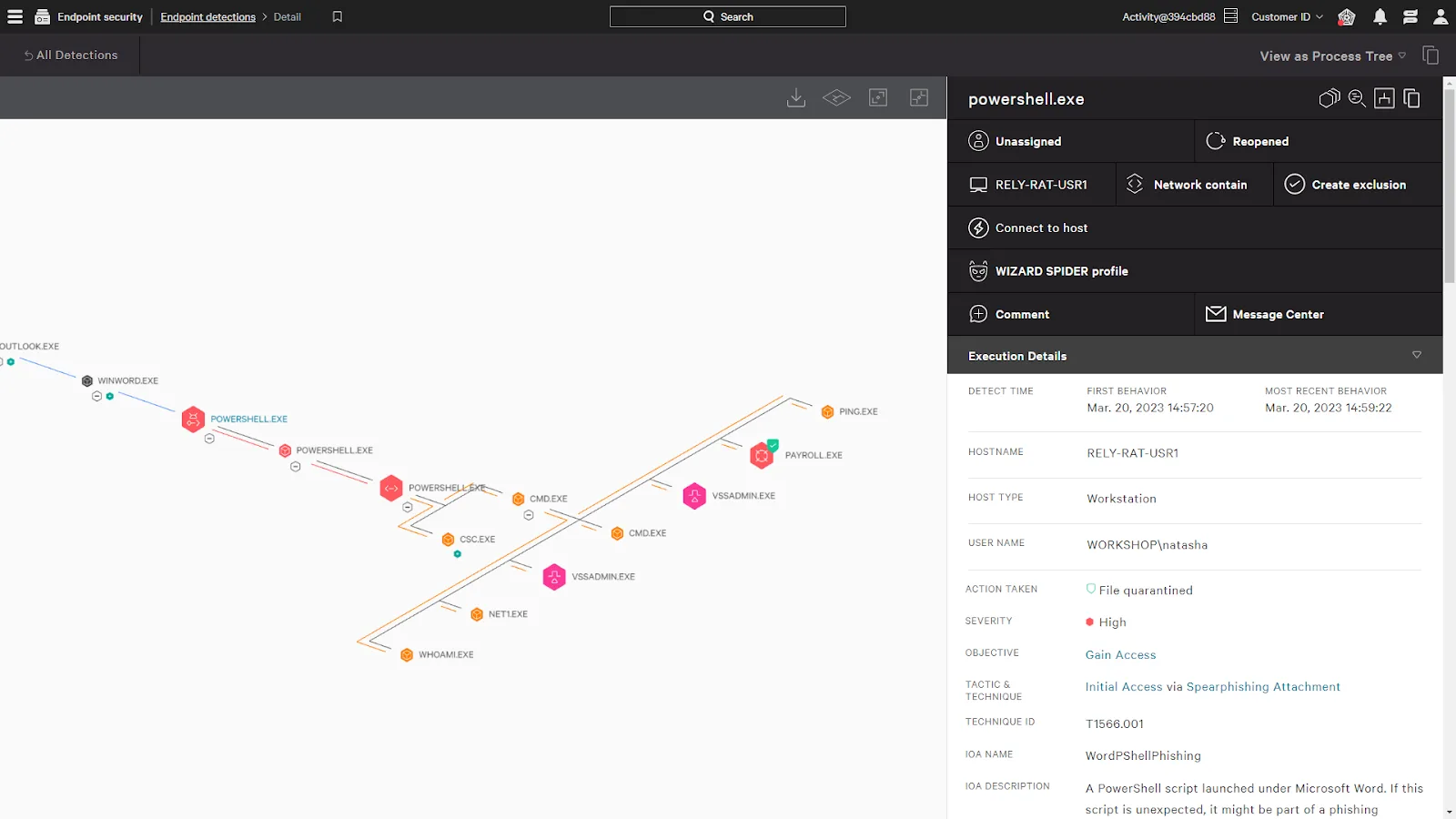
Every computer keeps a record of what ran, what it touched, and where it connected. When something looks wrong, the whole chain is on one screen, and one click cuts the device off from the network while we investigate.
Stop ransomware before it runs
Falcon judges files and scripts by what they do, not only by whether they're on a list of known malware. That's how it stops the brand-new ransomware variant that no list has caught up with yet.
- Known ransomware Matches known malware Blocked
- Never-seen-before file Tried to encrypt shared files Blocked
- Accounting app update Signed, expected behavior Allowed
Decide which USB drives are welcome
A thumb drive is still one of the easiest ways for data to walk out, or for something nasty to walk in. Approved company drives keep working, and unknown ones get blocked.
- Unknown USB drive Not on the approved list Blocked
- Company backup drive Approved by serial number Allowed
- USB keyboard Input devices always allowed Allowed
One set of firewall rules for every computer
The firewall built into each computer, set from one place across Windows, macOS, and Linux. Rules can tighten when a laptop leaves the office for hotel or airport Wi-Fi.
- Remote desktop from outside Every computer Blocked
- File sharing on public Wi-Fi Away from the office Blocked
- Office printer On the office network Allowed
Antivirus was built for a different kind of attack
Traditional antivirus checks files against a list. Falcon watches what's happening on the computer, so it can stop an attack that doesn't use a file at all.
Traditional antivirus
CrowdStrike Falcon
- Only catches files on a list of known malware Spots attacks by behavior, including brand-new ones
- Misses attackers who use stolen logins and built-in tools Flags PowerShell abuse and suspicious sign-ins as they happen
- No record of what happened before or after an alert A full activity history to trace exactly how it started
- A cleanup visit, usually after the damage is done Isolates a device from the network in one click, from anywhere
- Heavy scheduled scans that slow everyone down One lightweight agent that updates itself in the background
Who's watching
Three layers between an attacker and your business
Software that never sleeps, experts who hunt for what software misses, and a team that knows your business and follows through.
Automated
Falcon on every computer
Blocks malware, ransomware, and suspicious behavior the moment it sees it, day or night, online or off.
Always on
Hunted
CrowdStrike's threat hunters
Experts who look for the quiet, hands-on-keyboard attacks that automation alone can miss, and raise the alarm with what they found.
Around the clock, with Advanced Defend and Complete Defend
Handled
2Fifteen Tech
We review what Falcon and the hunters find, contain devices, clean up, and tell you what happened in words that make sense.
Business hours, with automated protection outside them
CrowdStrike MSSP coverage
Three levels of coverage, one agent
Every level runs on the same Falcon agent, so moving up is a change on our side, not a reinstall. We'll recommend the one that fits your risk, and it can change as you grow.
Level 1
Defend
Prevention and full visibility on every computer
Includes
- Next-generation antivirus (Falcon Prevent)
- Endpoint detection and response (Falcon Insight)
- USB device control
- Firewall management
- Activity history kept in the cloud for investigations
Level 2
Where most teams startAdvanced Defend
Adds experts hunting for attackers around the clock
Everything in Defend, plus
- 24/7 managed threat hunting (Falcon Adversary OverWatch)
- Hunters who look for hands-on-keyboard attacks that slip past automation
- Findings sent to us with what happened and what to do next
Level 3
Complete Defend
CrowdStrike's own team responds, any hour
Everything in Advanced Defend, plus
- Managed detection and response (Falcon Complete)
- CrowdStrike's analysts investigate, contain, and clean up threats around the clock
- Response that doesn't wait for anyone's business hours
Add-ons
Add what your business actually needs
Each one plugs into the same Falcon console, so everything it finds shows up in one place and lands with the same team.
Falcon Spotlight
Find unpatched software without running scans
Uses the agent that's already there to list every vulnerable app on every computer, ranked by which ones attackers are actually using.
Falcon Discover
Know every app, account, and device
A live inventory of what's installed, who's signing in, and which devices on your network aren't protected yet.
Identity Threat Protection
Catch stolen logins before they're used
Watches Active Directory and Microsoft Entra ID for stolen credentials and risky sign-ins, and can step in before a suspicious login goes through.
Falcon Data Protection
Stop sensitive files from walking out
Spots and blocks risky data movement on the computer itself, like client files headed to a personal cloud account or a USB drive.
Falcon for Mobile
Extend protection to company phones
Brings Falcon to iPhone and Android, watching for malicious apps and risky settings like an out-of-date or jailbroken phone.
Falcon Next-Gen SIEM
Every log, in one place, for a year
Pulls logs from your other systems into Falcon so detections can connect the dots, and keeps them a year for investigations and audits.
You get the protection, not another console
Falcon does the detecting and the blocking. We make sure it's on every computer, set up for your business, and that someone is paying attention to what it finds.
We roll it out and tune it
We install Falcon on every computer through the tools we already use to manage them, then set the policies that fit how your team actually works.
We watch what it finds
Falcon blocks threats on its own around the clock. We review detections and hunter findings during business hours and handle anything that needs a person.
We're your support line
No vendor tickets and no console to learn. If something needs CrowdStrike's engineers, we open the case and follow it through.
Frequently asked questions

Want to talk?
Not sure your current antivirus would catch a stolen login, or wondering which level of coverage makes sense for your team? We can help you figure out what fits.